My first ARCHICAD project was back in 2006 when I began using version 9. At the time, not only was I a complete novice in it (with nobody to take any training from) but the navigation in 3D was also extremely clunky — especially compared to what it is today. Rendering too was, well, nothing to write home about.
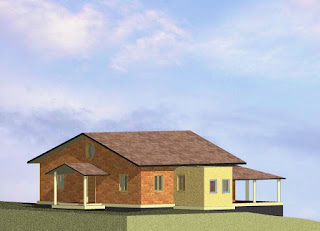 |
My first rendering in 2006 was really very amateurish
[ARCHICAD v.9] |
As you can see in this first image, I was actually working in parallel view! Maybe this wasn't exactly my first
ever ARCHICAD rendering but it is certainly the oldest one that survives on my hard drive. Creation date: 29
th May 2006 — just one day before I joined
Archicad-Talk. The image you see here bears little resemblance to the
completed house because, after it was created, the design went through multiple changes. At that point, I was still making the mistake of relying on flatland for my construction drawings — my understanding of how to use ARCHICAD was practically nil and, as always, there was a deadline to keep.
Over time, by constantly trawling the
forum, the wiki (now replaced by the
help-centre) and a handful of websites that carried articles and tutorials, things started to improve. Of course, there was a whole lot of trial and error but it finally became possible to get the output I needed without resorting to 2D drafting. Simultaneously, ARCHICAD's toolset improved and expanded, allowing us all to model more accurately and to minimise line-work.
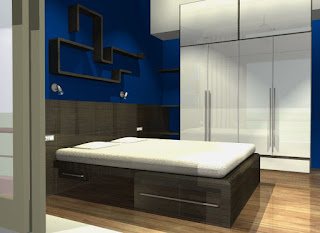 |
Interior remodel from 2011
[ARCHICAD v.13] |
Around 2010-2011, I had a very demanding client for an interior remodel, and that forced me to delve further into Lightworks than I might otherwise have done. The results (second image) were very obviously CGI but they did get the design across to the client's satisfaction. With few exceptions, clients are unable to relate to a plan or elevation, and seeing a 3D view — not even necessarily photo-realistic — is usually enough to make them understand what the architect has in mind.
It was around this time that I also formed a habit of making at least one GDL object per project. For this remodel, it was the
variegated tile object which was very useful in visualising how the bathrooms would look.
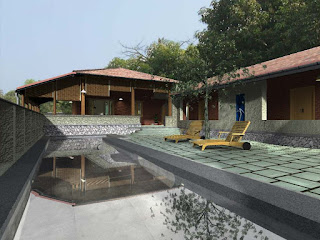 |
By 2013 things had become somewhat better
[ARCHICAD v.16] |
Fast forward a couple of years and we come to another house that was built just 100m away from the one in the first image. Designing began in v.13 but was quickly moved over to v.16. This was around the time that Graphisoft was re-entering the Indian market after a couple of lapsed years. The images (not to mention the construction drawings) for this project, were a whole lot better than before and practically everything was done in ARCHICAD. I think the only exception was a brick lattice wall for which I first tried alternatives in Sketchup.
Remember, the rendering engine was still Lightworks, so it took a
fair bit of effort to even get half-decent results. My clients were happy enough with it, so no complaints there. Coincidentally, the tile object from two years earlier came in use again here (this time for the kitchen), so all the time spent making it in the first place, was more than justified.
For this project, I made two GDL objects — a
füssball table and the roll-up bamboo blinds you see in the third image. The pool surface is a slightly undulating mesh, by the way. I dislike the repeating pattern of the default fieldstone surface but for some reason didn't do anything about it then. Apart from some paint colours — which changed at a late stage — this model is very close to what was
actually built.
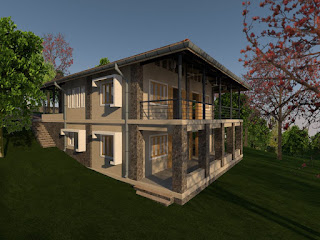 |
Current project: 2015-16
[ARCHICAD v.18] |
Finally, we come to a current project for which construction has yet to begin. This is in v.18 so the visualisation engine is CineRender. It would have been nice to have some better red silk-cotton trees but these cutouts do the job and they're not the focus of the design, so I'll live with that. The fieldstone texture, on the other hand, is much better than what came out of the box and actually looks like the kind of stonework that is common in these parts.
The construction drawings are complete now but I had really wanted to do them in v.19 so as to use the
new labels. That didn't happen though. Because of a mix-up, I still haven't got a replacement for my old green WIBU key which is not supported in v.19. I'm told it's coming though.
 |
Current project: 2015-16
[ARCHICAD v.18] |
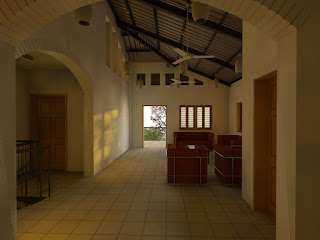
Not only are the exterior renderings hugely better in CineRender but even the stock settings for interiors are really so good that you might only need to make a few minor tweaks. I particularly like the soft, natural, summer evening light in this image which would have been difficult, if not impossible, to achieve with Lightworks — unless you were named Dwight Atkinson.
The GDL object for this project is an
underground water storage tank for harvesting rainwater. Why would I "spend" polygons on something underground? Well, the land slopes steeply and I need to see the tanks in my sections to ensure that they have been placed correctly. Happily, the object allows me to choose whether to cast shadows only for the part above ground (or not at all) so the extra polygons don't affect rendering time as far as I can tell.
 |
| Lightworks v/s CineRender |
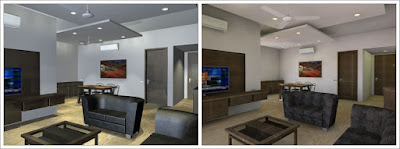
Finally, I opened an old file in versions 13 as well as 18 and rendered the same scene in both without making any changes. As you can see in the composite image above, they came out looking very different. Lightworks needed a lot of fiddling with the settings but, for CineRender, I just picked a preset scene; then, one click to turn on lights was all that was required.
We can expect CineRender to be around for quite a while, so expanding and improving our surface/texture libraries should be well worth the effort. So far, given the kind of work I do, I haven't felt the need to use an external rendering engine. Now, thanks to Lightworks being dropped in favour of CineRender, I have even less reason to consider one.


